Atari ST - 2026
Adventure - The 16-Bit Remaster
- Genre
- Adventure / Arcade - 2-D
- Year
- 2026
- Language
- [unknown]
- Publisher
- [no publisher]
- Controls
- Joystick / Keyboard
- Distributor
- Itch.io
- Players
- 1
- Developer
- TjLaZer
- Resolution
- Low
- Licensed from
- —
- Coder(s)
- [AI-assisted]
- Country

- Graphics
- [AI-assisted]
- Software
- English
- Game design
- Robinett, Warren
- Box/
Instructions - English
- Musician(s)
- [n/a]
- License
- PD / Freeware / Shareware
- Sound FX
- [AI-assisted]
- Serial
- —
- Cover
- —
- ST Type
- ST, STe / 0.5MB
- MIDI
- —
- Version
- —
- Dump
- Download
- Number of Disks
- 1 / Double Sided / HD Installable
- Dump format
- ST
- Protection
- —
ADDITIONAL COMMENTS
Please have a look at author's website how to support the game.
INSTRUCTIONS
ADVENTURE - THE 16-BIT REMASTER (Atari ST)
Original game: Warren Robinett, Atari 2600, 1980.

Atari ST remaster by TjLaZer, 2026.
The original 2600 game logic runs unchanged underneath, so the game plays
exactly like the original: same rooms, same dragons, same bat, same secrets.
Everything you see and hear is new:
- Redrawn 16-color graphics: brick castle walls with bevels and shadows,
  flagstone floors, shaded dragons, keys, sword, chalice, magnet, bat, bridge
  and gates.
- No flicker: every object in a room is drawn every frame (the 2600 could
  only show two at a time and flickered).
- Dark catacombs: the light around you shows the stonework, everything else
  is black.
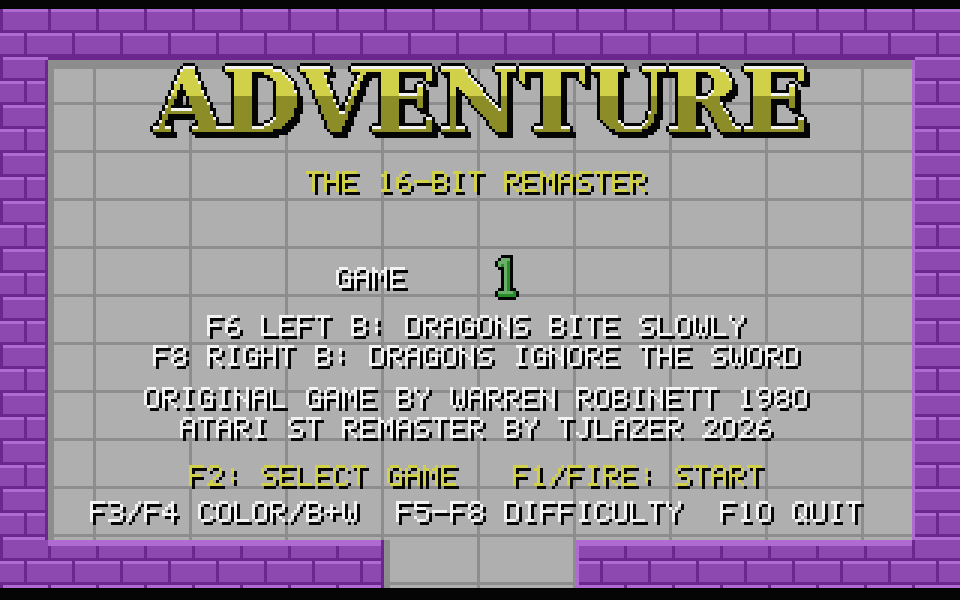
- New title screen.
- New 3-channel YM sound effects: pick up, drop, dragon roar, eaten, dragon
  slain and a victory fanfare.

REQUIREMENTS
Any ST, STF, STE or Mega ST with 512K or more.

Color monitor or TV (low resolution). The remaster does not run on a mono
monitor; it tells you so and returns to the desktop.

The game runs at 60 Hz (the program switches the ST to 60 Hz and restores your
setting on exit).

The disk boots straight into the game from the AUTO folder. ADVENTUR.PRG can
also be run from the desktop.

When you walk into a new room the screen goes black for one or two frames
while the new room is drawn. That is intentional.

CONTROLS
Joystick (joystick port) or W A S D / cursor keys - move
Fire or Space - drop the object you are carrying
(on the game-select screen, or after you win, fire starts a new game)

F1 Game Reset (start / restart, also revives you if eaten)
F2 Game Select (choose game 1, 2 or 3)
F3 Color F4 Black & white (grey shades)
F5 Left difficulty A F6 Left difficulty B
F7 Right difficulty A F8 Right difficulty B

Esc Back to the game-select screen
F10 Quit to desktop

DIFFICULTY (F5-F8)
These are the 2600's two difficulty switches. Both start on B.
Left A (F5): dragons bite fast - hard to escape once caught
Left B (F6): dragons pause after roaring - you can run or fight
Right A (F7): dragons flee when you hold the sword
Right B (F8): dragons come at you even when you have the sword
The current setting is shown on the game-select screen, and for a few seconds
at the top of the screen when you change it.
TRIVIA (1)
Origins
Based on Warren Robinett / Atari 1980 Atari 2600 game.